JS SDK
Overview
Embodia AI Embodied Driving upgrades AI expression from "text" to "3D multi-modal." Based on text input, it generates voice, expressions, and actions in real-time to drive 3D digital humans or humanoid robots, achieving natural expressions comparable to real people. Compared to traditional AI that only outputs text or voice, Embodia AI provides richer expressiveness and a more natural interactive experience.
Key Features
1. Real-time 3D Digital Human Rendering and Driving
2. Voice Synthesis (SSML Support) and Lip-sync
3. Multi-state Behavior Control (Idle / Listen / Speak, etc.)
4. Widget Component Display (Images, subtitles, videos, etc.)
5. Customizable Event Callbacks and Logging System
Environment Requirements
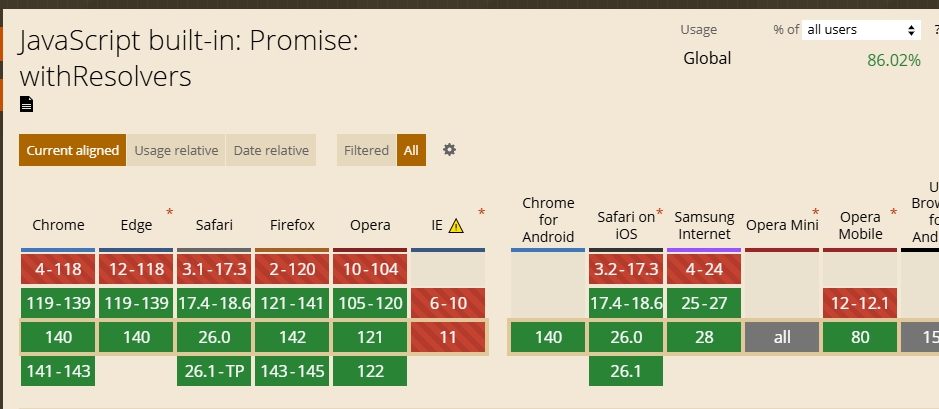
JS SDK
Browser Requirements
Android SDK
System Requirement: Android 11 and above
Chip Requirements:
Chip Version | Recommended Resolution |
RK3588 | 1080P |
RK3566 | 720P |
Other Chips | Please contact us for testing |
Quick Start
1.1 Preparation
(1) Include the following dependencies in your page:
<!DOCTYPE html>
<html lang="en">
<body>
  <div style="width: 400px; height: 600px">
    <div id="sdk"></div>
  </div>
  <script src="https://media.embodia.ai/xingyun3d/general/litesdk/xmovAvatar@latest.js"></script>
</body>
</html>
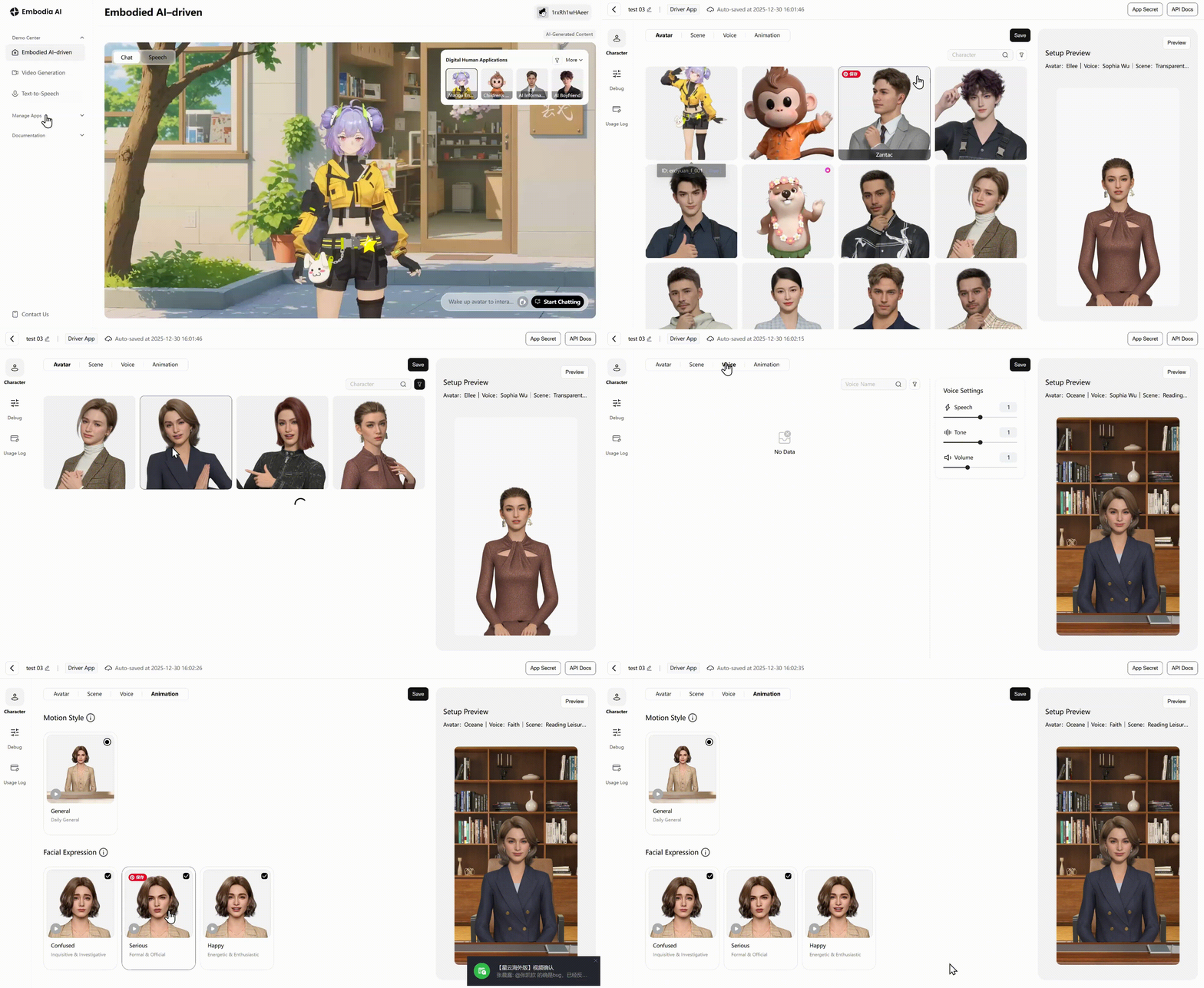
Set Virtual Human Character and Obtain Credentials: Log in to Embodia AI (https://www.embodia.ai/)
(2) to create a driving application in the App Center. Select the character, voice, and performance style to obtain the App ID and App Secret.
1.2 Creating Instance
const LiteSDK = new XmovAvatar({
  containerId: '#sdk',
  appId: '',
  appSecret: '',
  gatewayServer: 'https://nebula-agent.embodia.ai/user/v1/ttsa/session',
  // Custom renderer. When this method is passed in, all events of the SDK will be returned, and the implementation logic of all types of events is defined by this method
  onWidgetEvent(data) {
    // Handle widget events
    console.log('Widget事件:', data)
  },
  // Proxy renderer. The SDK supports subtitle_on, subtitle_off and widget_pic events by default. Through proxy,
  // the default events can be modified, and the business side can also implement various other events.
  proxyWidget: {
    "widget_slideshow": (data: any) => {
      console.log("widget_slideshow", data);
    },
    "widget_video": (data: any) => {
      console.log("widget_video", data);
    },
  },
  onNetworkInfo(networkInfo) {
    console.log('networkInfo:', networkInfo)
  },
  onMessage(message) {
    console.log('SDK message:', message);
  },
  onStateChange(state: string) {
    console.log('SDK State Change:', state);
  },
  onStatusChange(status) {
    console.log('SDK Status Change:', status);
  },
  onStateRenderChange(state: string, duration: number) {
    console.log('SDK State Change Render:', state, duration);
  },
  onVoiceStateChange(status:string) {
      console.log("sdk voice status", status);
  },
  enableLogger: false, // Do not display SDK logs, default is false
})
Initialization Parameters
Parameter Name | Type | Parameter | Mandatory | Description |
containerId | string | - | Yes | Container element ID |
appId | string | - | Yes | Digital human app ID (obtained from the business system) |
appSecret | string | - | Yes | Digital human secret ID (obtained from the business system) |
gatewayServer | string | Yes | Digital human service interface access path | |
onWidgetEvent | function | - | No | Widget event callback function |
proxyWidget | Object | - | No | The SDK supports subtitle_on, subtitle_off and widget_pic events by default.You can rewrite default events or support custom events in two ways:1. Use onWidgetEvent to proxy all events (the SDK outputs all events).2. Use proxyWidget to proxy events (implement custom events or proxy default events as needed).Event priority: onWidgetEvent > proxyWidget > default events |
onVoiceStateChange | Function | Status: audio playback state- "start": start playback- "end": playback ended | No | Monitor SDK audio playback state |
onNetworkInfo | function | networkInfo: SDKNetworkInfo (see: Parameter Description) | No | Current network status |
onMessage | function | message: SDKMessage (see: Parameter Description) | Yes | SDK message |
onStateChange | function | state: stringSee digital human state description below | No | Monitor digital human state changes |
onStatusChange | function | status: SDKStatus (see: Parameter Description) | - | - |
onStateRenderChange | function | - | No | Monitor the period from sending action to state animation rendering when the digital human state changes |
enableLogger | boolean | - | No | Whether to print SDK logs |
Parameter Definitions
enum EErrorCode {
  CONTAINER_NOT_FOUND = 10001,   // Container does not exist
  CONNECT_SOCKET_ERROR = 10002,  // Socket connection error
  START_SESSION_ERROR = 10003,   // Session start error
  STOP_SESSION_ERROR = 10004,    // Session stop error
  VIDEO_FRAME_EXTRACT_ERROR = 20001, // Video frame extraction error
  INIT_WORKER_ERROR = 20002,         // Worker initialization error
  PROCESS_VIDEO_STREAM_ERROR = 20003, // Stream processing error
  FACE_PROCESSING_ERROR = 20004,      // Facial processing error
  BACKGROUND_IMAGE_LOAD_ERROR = 30001, // Background load error
  FACE_BIN_LOAD_ERROR = 30002,         // Face data load error
  INVALID_BODY_NAME = 30003,           // Invalid body data
  VIDEO_DOWNLOAD_ERROR = 30004,        // Video download error
  AUDIO_DECODE_ERROR = 40001,          // Audio decode error
  FACE_DECODE_ERROR = 40002,           // Face data decode error
  VIDEO_DECODE_ERROR = 40003,          // Video decode error
  EVENT_DECODE_ERROR = 40004,          // Event decode error
  INVALID_DATA_STRUCTURE = 40005,      // Invalid data structure from TTSA
  TTSA_ERROR = 40006,                  // TTSA downlink error
  NETWORK_DOWN = 50001,                // Offline mode
  NETWORK_UP = 50002,                  // Online mode
  NETWORK_RETRY = 50003,               // Retrying network
  NETWORK_BREAK = 50004,               // Network disconnected
}

interface SDKMessage {
  code: EErrorCode;
  message: string;
  timestamp: number;
  originalError?: string;
}

enum SDKStatus {
  online = 0,
  offline = 1,
  network_on = 2,
  network_off = 3,
  close = 4,
}
1.3 Initialization
Call the init method to initialize the SDK and load resources:
async init({
  onDownloadProgress?: (progress: number) => void,
}): Promise<void>
Parameter Description
- onDownloadProgress: Progress callback (range: 0 to 100). If loading fails,
stopSessionis called automatically to prevent reconnection issues.
1.4 Driving Digital Human to Speak
speak:Control the virtual human to speak:
speak(ssml: string, is_start: boolean, is_end: boolean): void
Parameter Description:
SSML: You can directly pass in the content you want the digital human to say, or you can pass in markup language in SSML format to specify the digital human to perform KA actions. For details, see Advanced Integration.
Non-streaming Example:
speak("Welcome to Embodia AI", true, true);
1.5 Destroy Example
Destroy the SDK instance and disconnect:
destroy(): void
Advanced Integration
1 Digital Human State Switching
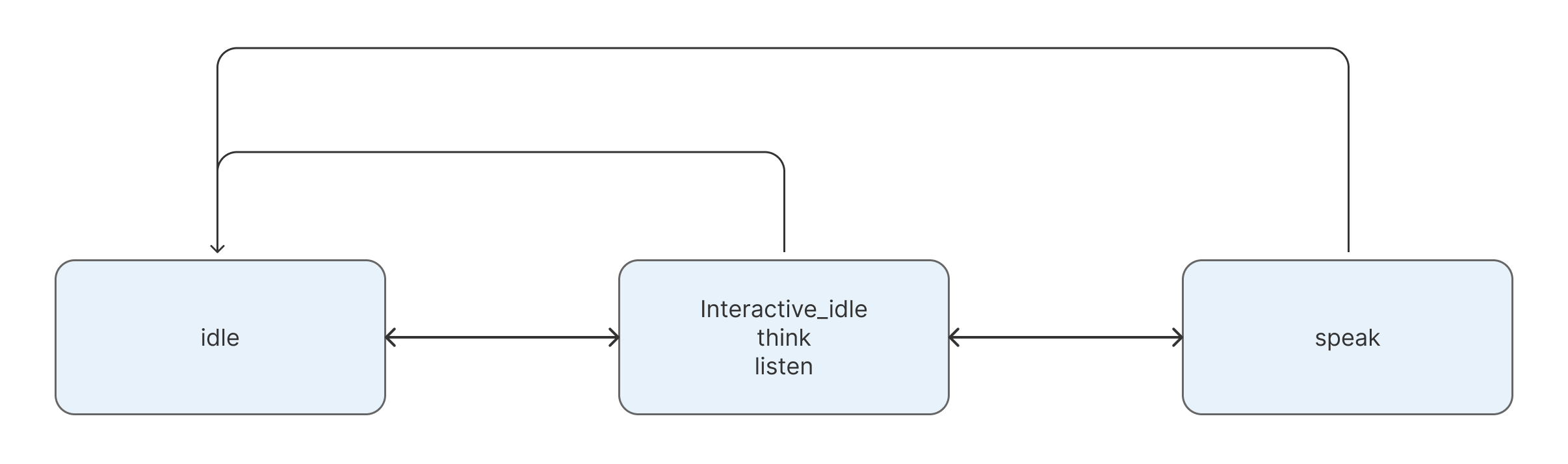
1.1 Overview
State Name | English ID | Description | API Method |
|---|---|---|---|
Offline Mode | offlineMode | No credits consumed in this state | offlineMode(): void |
Online Mode | onlineMode | Return to online mode from offline | onlineMode(): void |
Idle | idle | No user interaction for a long time | idle(): void |
Interactive Idle | interactive_idle | Loop state to interrupt current behavior | interactiveidle(): void |
Listen | listen | Digital human is in listening state | listen(): void |
Think | think | State before response starts | think(): void |
Speak | speak | Control virtual human to speak | speak(...) |
1.2 Speak Details
1.2.1 Streaming Output
Call speak method for streaming by managing the is_start and is_end flags:
- First chunk:
is_start = true, is_end = false - Middle chunks:
is_start = false, is_end = false - Last chunk:
is_start = false, is_end = true
1.2.2 SSML Samples
Semantic KA Instruction
<speak>
  Warmly
  <ue4event>
    <type>ka_intent</type>
    <data><ka_intent>Welcome</ka_intent></data>
  </ue4event>
  Welcome, distinguished guests, for taking the time from your busy schedules to visit and guide us! Your arrival is like a spring breeze, bringing us valuable experience and wisdom. This affirmation and support encourage us greatly. We look forward to gaining more growth and inspiration under your guidance and writing a more brilliant chapter together!
</speak>
Skill KA Instruction
<speak>
<ue4event>
    <type>ka</type>
    <data><action_semantic>dance</action_semantic></data>
  </ue4event>
</speak>
Speak KA Instruction
<speak>
  <ue4event>
    <type>ka</type>
    <data><action_semantic>Hello</action_semantic></data>
  </ue4event>
  Welcome to the Embodia AI 3D digital human platform. There is a lot of exciting content waiting for you to discover~
</speak>
For detailed KA query interface instructions, please refer to the "Embodied Driving KA Query Interface Documentation."
Notes:
- To ensure optimal digital human presentation, it is recommended to accumulate a short segment of content before the first call in a streaming scenario. This ensures that the digital human's speaking speed (consumption rate of text) remains lower than the subsequent streaming output speed of the LLM.
speakdoes not allow multiple consecutive calls (i.e., callingspeakimmediately afteris_end=truein a previous call). It is recommended to useinteractive_idleorlistento perform a state transition in between.- During the
speakprocess,onVoiceStateChangewill trigger events:voice_startindicates the start of speech, andvoice_endindicates the end. These can be used to manage the digital human's speaking status.
2. Other Methods
setVolume: Controls volume. Range: 0 to 1 (0: Mute, 1: Max).
setVolume(volume: number): void
showDebugInfo: Display debugging information.
hideDebugInfo: Hide debugging information.
showDebugInfo(): void
hideDebugInfo(): void
Precautions
1. Ensure the container element has explicit width and height; otherwise, the rendering effect may be affected.
2. All mandatory parameters must be provided during initialization.
3. Calling the destroy() method will clean up all resources and disconnect the session.
4. It is recommended to use showDebugInfo() in the development environment to assist with debugging.
Error Code Definition and Troubleshooting Suggestions
Type | Error Code | Description |
|---|---|---|
Initialization Error | 10001 | Container does not exist |
10002 | Socket connection error | |
10003 | Session error: | |
10004 | Session error: | |
Frontend Processing Logic Error | 20001 | Video frame extraction error |
20002 | Error initializing video frame extraction WORKER | |
20003 | Error processing extracted video stream | |
20004 | Expression processing error | |
Resource Management Error | 30001 | Background image loading error |
30002 | Expression data loading error | |
30003 | Body data has no Name | |
30004 | Video download error | |
SDK TTSA Data Acquisition & Decompression Error | 40001 | Audio decoding error |
40002 | Expression decoding error | |
40003 | Body video decoding error | |
40004 | Event decoding error | |
40005 | TTSA returned data type error (not audio, body, face, event, etc.) | |
40006 | Abnormal information sent by TTSA downstream | |
Network Issues | 50001 | Offline mode |
50002 | Online mode | |
50003 | Network retry | |
50004 | Network disconnected |
Best Practices
1. Call the destroy() method to clean up resources before the page unmounts
2. Use error callbacks properly to handle abnormal situations
3. Use SSML format to control the virtual human's speaking effect
4. Implement the onWidgetEvent callback when you need to customize Widget behavior
5. When using the KA plugin, it is recommended to test the action intent recognition effect first, and adjust the configuration parameters as needed
Frequently Asked Questions
Q: How to avoid excessive points consumption?
A: It is recommended to use basic voice timbre during debugging; you can switch to offline mode when there is no interaction for a long time.
Q: How to switch digital humans?
A: You can create multiple embodied driving applications on the Mofa Nebula Platform, and switch digital humans by destroying the instance and reconnecting (accessing the new application).
Q: Will starting the project via an IP address cause an error?
A: Some methods used in the SDK only support localhost or HTTPS calls.
Q: Can digital humans be customized?
A: Yes. If you have such needs, you can scan the QR code to contact us.